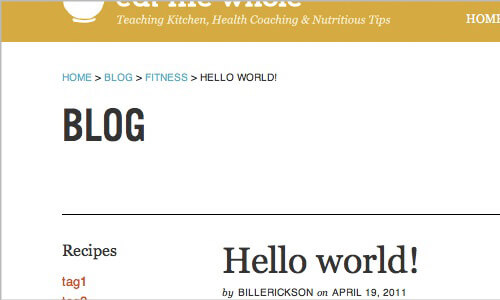
One of the many great features of Genesis is the built-in breadcrumbs. No plugin is required, and they're VERY customizable. Of course there's the Breadcrumb toggles in Genesis > Theme Settings that let you specify where they show up. But you can do a lot more with code.
If you look in /genesis/lib/classes/breadcrumb.php you'll see all the code used for the breadcrumbs. For each instance of a breadcrumb (single, archive, home, blog, page...) there's a function for it and a filter to modify that function's output.
To modify the breadcrumbs, just pick the filters you want to use and write a function that does something with the $crumb.
In this example, I'll add "Blog" before "Category" on the category and single breadcrumbs. By default, the breadcrumb renders this:
- On blog home: Home > Blog
- On category: Home > Category
- On single post: Home > Category > Post Title
Here's how I do it:
The bottom two lines are the filters I want to modify (single and archive). In my function I'm using get_option('page_for_posts') to get the ID of the blog homepage. I'm then using the core WordPress functions get_permalink() and get_the_title() to return the permalink and title of this page ID.
This line ( if ( is_singular( 'post' ) || is_category() ) ) ensures this only applies to blog posts and post categories. The filters are also used for posts in custom post types and taxonomies.



No comments yet