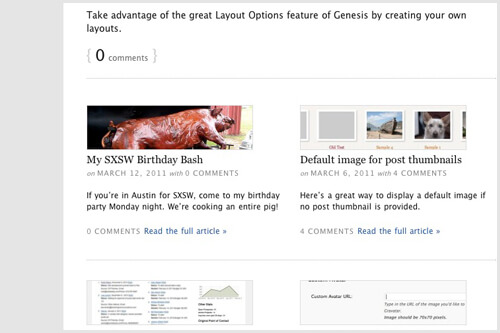
I recently rebuilt my blog using the Genesis Grid Loop, a nifty function in Genesis that let's you break your content into a few large features followed by a grid of smaller posts.
Here's two tutorials to get you started: How to Use the Genesis Grid Loop and Genesis Grid Loop Advanced .
Once you work your way through those you'll be able to set up the grid using however many features and columns of grid posts you'd like. But what if you want to alter the content of the features and grid posts? I'll walk you through the following:
- Setting up the features and grid posts to display the excerpt instead of a truncated version of the content. This way you can write a summary of the post to show up on your blog.
- Moving the thumbnail in the grid posts from below the title to above it.
- Adding a divider between each row of the grid.
Setup
First we'll need to set up the grid loop. For a more detailed explanation of what's going on here, refer to the two tutorials I referenced earlier. I have grid_image_size = '0' so that no image is displayed on grid posts. I've also set up an image size called "child_full" for the features and "child_thumbnail" for grid posts outside of this code (in functions.php).
I'm using the "child" prefix throughout this, but please change this to your own prefix (I use my initials, be_). This ensures your code won't interact with code written by someone else.
In my child theme I've created a file called home.php (this is the template file for the blog page). It has the following in it:
Using the Excerpt
If you dig into /lib/structure/loops.php, you'll see that the grid loop generates the content using the function genesis_grid_loop_content(). We'll need to unhook this and replace it with our own function. It's a good idea to copy this function and use it as a base for your modifications.
In our home.php file, right before genesis(), I'm adding this function:
We've replaced the genesis_grid_loop_content() with our own function, which we'll now need to create. Here's my child_grid_loop_content() (again, place before genesis()). I've also added some code to render the comment numbers the way I want.
Now when you load the site it will display excerpts instead of the beginning of your post.
Thumbnail Above Grid Posts
The function genesis_grid_loop_content() placed the image for grid posts between the title and the content. I wanted it above the title, so in the grid loop helper function I told it to not include images for the grid posts, and now I'll add my own function to place the image.
Inside the child_switch_content() function, add this line:add_action('genesis_before_post_title', 'child_grid_loop_image');Then, right before genesis() add this function:
This checks to see if we're on a grid post, and if we are it displays the thumbnail. Because we've hooked this into genesis_before_post_title it will show up before the post title.
Row Dividers
Finally, let's add a divider between each row of posts. I'm going to be adding an <hr /> tag, but you could add whatever you want. Add this line to the child_switch_content() function:add_action('genesis_after_post', 'child_grid_divider');Then, before genesis() add this function:
This assumes that you have two features and two columns of grid posts. If you have something different be sure to modify this function. Here's what each part of it means:
(($loop_counter + 1) % 2 == 0)= If we're on an even post, return true. The loop counter starts with 0, so the second post is 1, fourth post is 3 .... Replace 2 with however many columns of grid posts you have.&& !($paged == 0 && $loop_counter < 2)= ... And if we're on the first page, make sure we're not on a feature. Replace 2 with the number of features you have.
I also added the following CSS to my style.css file for the <hr />:
Whatever element you use, make sure you set the width to 100% in your CSS.
Putting it all together
Here's the completed home.php file:



No comments yet