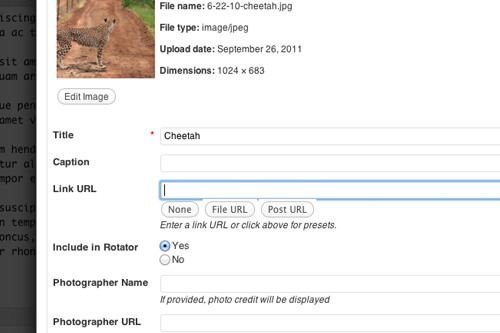
Images in WordPress can have as much metadata (data about the image) as you want. WordPress stores images as posts in the "attachment" post type, so all the standard WordPress functions you're used to using with posts also work with images. For example, captions are stored as excerpts .
If you want to collect additional information on a post you typically use a metabox . For images, you can add your custom fields directly to the media uploader.
There's two filters we'll use: attachment_fields_to_edit and attachment_fields_to_save.
I'm going to provide two examples that I use often: adding a "Photo credit" section, and adding an "Include in Rotator" selection.
Adding Photo Credit
You'll often need to provide attribution to the source of images you use on your website. Rather than sticking it at the top or bottom of the post, we can add that information as photo metadata and then include it in the theme.
I'm going to add two text fields, Photographer Name and Photographer URL.
[gist id=1243250]
In the first function we used a simple array to specify the field's Label, input type, value, and help text. In the second function, we check to see if a value has been set for those fields, and if so we update the post metadata.
To access this information in our theme, we simply have to get the post meta for the thumbnail. Assuming we want it for the featured image, we'd do something like this: get_post_meta( get_post_thumbnail_id(), 'be_photographer_name', true );
Include in Rotator
Adding text fields is rather easy. What if you want something more custom? If you use the 'html' input type, you can output whatever HTML you'd like.
I love using the built-in Gallery feature in WordPress for managing image rotators on specific posts or pages. The problem is that all images are included in the gallery. So I add an "Include in Rotator" option when editing the image, and then I can query for all attached images that were marked "Yes".
For more examples of creating html inputs for the media gallery, look in /wp-admin/includes/media.php.
[gist id=1243276]
Then when I want to get all the attached images that are going in the rotator, I run something like this:
[gist id=1243289]



No comments yet