Custom post types should be used to differentiate between different types of content. A useful feature that's missing is the ability to form a relationship between posts in one content type and another.
For example, if you have an Events post type and a Musicians post type, you might want to link a musician with a certain event.
A recent client needed this feature, so I hired Chris Bratlien to help me develop it. I'm releasing the code to the WordPress community to help others solve this problem.
Code
Before you drop this code in your site, be sure to read the usage notes below. There's some parts you'll need to change to fit your needs.
Download the code here.
Here's the content of erickson-post-links.php, which you can either drop directly in your functions.php file or keep in a separate file and include it:
[php]/*** Erickson Post Links **/
global $wpdb;
define('BE_LINKS', $wpdb->prefix . 'be_links');
function be_create_post_type() {
register_post_type( 'events',
array(
'labels' => array(
'name' => __( 'Events' ),
'singular_name' => __( 'Event' )
),
'public' => true,
)
);
register_post_type( 'musicians',
array(
'labels' => array(
'name' => __( 'Musicians' ),
'singular_name' => __( 'Musician' )
),
'public' => true,
)
);
}
//add_action( 'init', 'be_create_post_type' );
// ** Uncomment the above line if you need to generate the post types
function create_be_links_table() {
global $wpdb;
if($wpdb->get_var("SHOW TABLES LIKE '" . BE_LINKS . "'") != BE_LINKS) {
$sql = "CREATE TABLE `" . BE_LINKS . "` (
`id` BIGINT NOT NULL AUTO_INCREMENT PRIMARY KEY ,
`a` BIGINT NOT NULL ,
`b` BIGINT NOT NULL
) ENGINE = MYISAM ;";
$wpdb->query($sql);
$sql = " ALTER TABLE `" . BE_LINKS . "` ADD UNIQUE `uniqueAB` ( `a` , `b` );";
$wpdb->query($sql);
}
}
add_action('init','create_be_links_table');
function be_link($a,$b) {
global $wpdb;
if ($a == $b) {
return;
}
$sql = sprintf(
"INSERT INTO %s" .
" (a,b) " .
" VALUES " .
" (%d,%d) ",
BE_LINKS,
$a,
$b);
$wpdb->query($sql);
}
function be_unlink($a,$b) {
global $wpdb;
$sql = sprintf(
"DELETE FROM " . BE_LINKS .
" WHERE (a = %d AND b = %d) " .
" OR (a = %d AND b = %d) "
,
$a,
$b,
$b,
$a);
$wpdb->query($sql);
}
function be_unlink_all($id) {
global $wpdb;
$sql = sprintf(
"DELETE FROM " . BE_LINKS .
" WHERE a = %d " .
" OR b = %d "
,
$id,
$id);
$wpdb->query($sql);
}
function be_peers($id) {
global $wpdb;
$sql = sprintf(
" SELECT a,b FROM %s " .
" WHERE a = %s" .
" OR b = %s",
BE_LINKS,
$id,
$id);
$rows = $wpdb->get_results($sql);
$result = array();
foreach ($rows as $row) {
if ($row->a == $id) {
$result[] = $row->b;
}
else {
$result[] = $row->a;
}
}
return $result;
}
function be_insert_post($post_id,$post = null) {
$old_peers = be_peers($post_id);
$new_peers = array();
if (array_key_exists('peer',$_POST)) {
foreach($_POST['peer'] as $id => $on) {
$new_peers[] = $id;
}
}
$inserts = array_diff($new_peers,$old_peers);
$deletes = array_diff($old_peers,$new_peers);
foreach($deletes as $peer) {
be_unlink($post_id,$peer);
}
foreach($inserts as $peer) {
be_link($post_id,$peer);
}
}
add_action('wp_insert_post','be_insert_post');
function be_metabox_init() {
add_meta_box("link-meta", "Musicians", "be_link_meta_box", "events");
add_meta_box("link-meta", "Events", "be_link_meta_box", "musicians");
//add_meta_box( $id, $title, $callback, $page, $context, $priority, $callback_args );
}
add_action('admin_init','be_metabox_init');
function be_link_meta_box() {
global $post;
if ($post->post_type == 'events') {
$peer_term = 'musicians';
}
else {
$peer_term = 'events';
}
$all_peers = get_posts('posts_per_page=-1&showposts=-1&post_type=' . $peer_term);
$my_peers = be_peers($post->ID);
?>
<table>
<?php foreach($all_peers as $peer): ?>
<tr>
<td>
<input type="checkbox" name="peer[<?php echo $peer->ID; ?>]"
<?php if (in_array($peer->ID,$my_peers)) { echo 'checked="checked"'; } ?> />
</td>
<td>
<?php echo $peer->post_title; ?>
</td>
</tr>
<?php endforeach; ?>
</table>
<?php
}[/php]
Usage Notes
- I've included the code to create two post types, but it's not activated. To create two new post types, remove the
//fromadd_action( 'init', 'be_create_post_type' );. - This code assumes you have post types named Events (slug
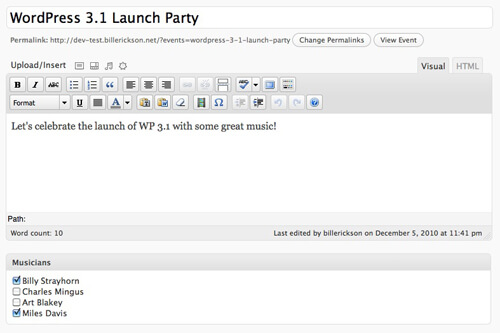
events) and Musicians (slugmusicians). Make sure you replace all the names and slugs with the post types you're using. - Once the code is set up correctly, log into the WordPress backend. Add or create a post in one of the post types. If you're in the Events post type, you'll see a list of all the Musicians posts. Check any that are applicable. (See the screenshot at the top of this post.)
- Here's how to use it in your theme: $peers = be_peers($post->ID);
- $peers will store an array of post ID's, and you can do whatever you like with it.
Examples
This will display an unordered list of the linked posts:
$peers = be_peers($post->ID);
if($peers):
echo '<ul>';
foreach ($peers as $peer)
 echo '<li><a href="'.get_permalink($peer).'">'.get_the_title($peer).'</a></li>';
echo '</ul>';
endif;
This will display the post thumbnail, post title (linked to post) and summary. Below the code is a screenshot of it in use:
$peers = be_peers($post->ID);
if($peers):
if(get_post_type() == 'events') {
echo '<ul>';
echo '<h3>Featuring</h3>';
foreach ($peers as $peer):
echo '<div>'.get_the_post_thumbnail($peer, 'thumb').'<a href="'.get_permalink($peer).'">'.get_the_title($peer).'</a><br />'.get_post($peer)->post_excerpt.'</div>';
endforeach;
echo '</ul>';
}
endif;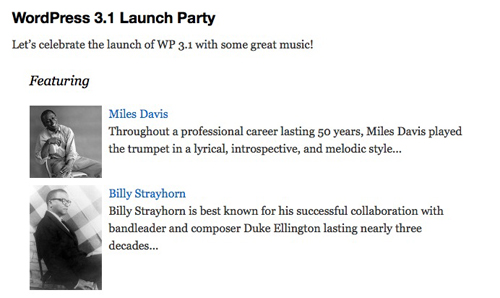
Future Improvements
There's two big additions I'm planning to make in the future:
- Make it so you can link any number of post types together. Right now the code is limited to two.
- Turn this into a plugin with a backend interface, so you don't have to mess with code to implement it.
Right now, this solution is working well for my needs, so that's a wish-list. When one of them becomes necessary for a client project it will get done, or if I have enough free time.
I've also found a request for this feature being integrated in WordPress core , but it was shot down. I agree with Mike Schinkel that this is a common need by those who use WordPress as a CMS, and would love to see it become part of core. Until then, I'll use this solution.
Feel free to take my code and implement any improvements you can think of. Just please share those improvements.



No comments yet